What Is Review Collection in UpBlick?
Reviews & Review Collection
Review collection in UpBlick is the process of inviting real customers to share feedback after an interaction with your business and, when your selected workflow includes it, giving them a direct way to continue to your Google review page.
It brings review links, customer requests, QR codes, NFC cards, website access, feedback forms, reminders, and reporting into one location-based workflow.
What review collection includes
An UpBlick review collection workflow can include:
- A review destination connected to the correct business location.
- Review requests sent to customers using available communication channels.
- QR Code Standee and NFC tap access for in-person customers.
- A Review Widget with a Write review action for website visitors.
- A customer feedback form with ratings and configurable questions.
- AI-assisted review drafts that customers can review and edit.
- Google review sharing when it is enabled for the selected workflow.
- Reminder and thank-you steps.
- Request, response, conversion, channel, and reminder reporting.
The three review collection modes
Each business location can use one of three modes in its Review Settings.
1. Collect Feedback & Suggest an AI-Assisted Review
UpBlick collects structured customer feedback, analyzes the experience, and prepares personalized review drafts based on what the customer submitted.
The customer chooses a draft, edits it or writes their own wording, and reviews the final text. When a Google Review Link is available, the customer can choose to continue to Google and publish the review themselves.
This mode is useful when you want both customer insights and a simpler path to Google Reviews.
2. Send Customers Directly to Google
UpBlick sends the customer directly to the location’s Google review page without first collecting feedback through the UpBlick form.
This mode provides the shortest review journey but does not capture the same structured UpBlick feedback before the Google page opens.
3. Collect Feedback for Business Analysis
UpBlick collects feedback for sentiment analysis, issue identification, and service improvement. An AI-assisted draft may be suggested, but the customer is not directed to Google to publish it.
This mode is useful when your main goal is understanding customer experience rather than generating a public Google review.
How customers enter the review journey
Customers can open the relevant location’s journey in several ways:
- Customer review request: A request sent after the customer is added to UpBlick.
- WhatsApp: An approved review request template with a review link.
- Email: A review request containing the location’s review link.
- QR Code Standee: The customer scans a printed location-specific code.
- NFC Card: The customer taps a compatible phone on a card containing the location’s Public Review URL.
- Review Widget: The customer selects Write review on your website.
The customer does not need to create an UpBlick business account or install an UpBlick app.
What customers may be asked
When feedback collection is enabled, the form can ask for information such as:
- An overall experience rating.
- The service the customer used.
- What stood out about the experience.
- The team member who helped them.
- The customer’s own review wording or an edited AI-assisted draft.
The available questions depend on the location’s form settings. Some questions can be disabled or customized.
What UpBlick records
Depending on the selected mode, channel, and available tracking data, UpBlick can organize:
- Customer and location connected to the request.
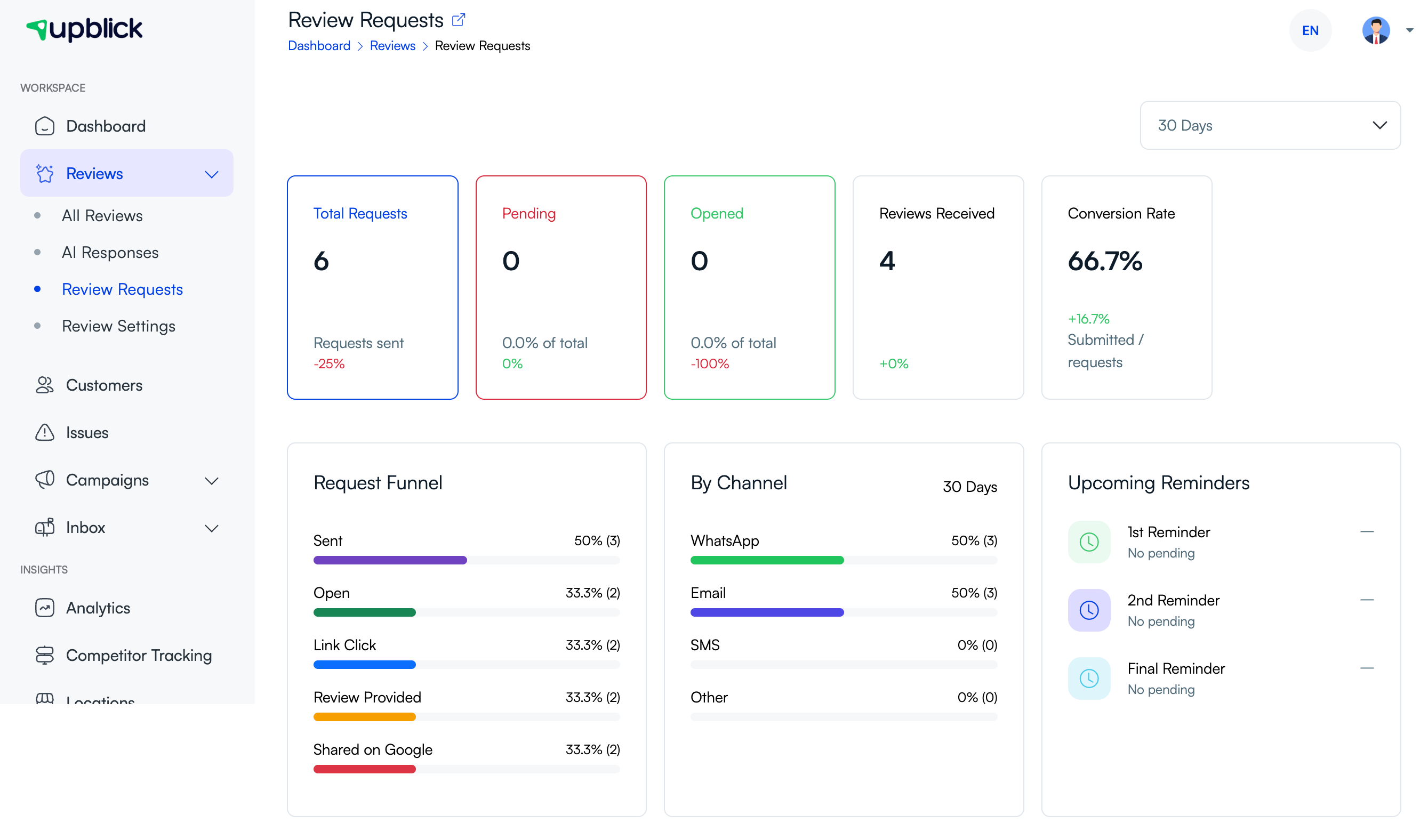
- Requests sent, pending, or opened.
- Review-link clicks and completed feedback.
- Reviews received and reviews shared on Google.
- Request performance by channel.
- Customer ratings, selected highlights, and written feedback.
- Upcoming reminder activity.
- Sentiment, issues, and recurring feedback themes when analysis is available.
UpBlick feedback and Google Reviews are different
UpBlick feedback is information submitted through the UpBlick review journey. It can support customer analysis, issue identification, and an AI-assisted draft.
A Google Review is published on Google by the customer. UpBlick can provide the correct Google review destination, but the customer controls whether to continue, what to publish, and the final rating and wording.
Submitting feedback in UpBlick does not automatically guarantee that a Google Review will be published.
What review collection is not
- It is not a way to create fake customer reviews.
- It does not publish a Google Review without the customer’s action.
- It does not replace Google Reviews or the Google Business Profile.
- It does not guarantee a particular review volume, rating, ranking, or business result.
- It should not be used to pressure customers into leaving a particular star rating.
Why businesses use UpBlick review collection
- Make it easier for customers to share an experience at the right time.
- Use consistent requests instead of relying on staff memory.
- Provide different access methods for online and in-person customers.
- Understand customer feedback that may not appear in a public review.
- Track request progress and channel performance.
- Keep review activity organized by business location.
- Identify service problems and follow-up opportunities.
Good review collection practices
- Ask real customers after a genuine business interaction.
- Obtain consent before storing contact details or sending communications.
- Use the correct review link for each location.
- Ask for honest feedback without requesting a specific rating.
- Use a limited and respectful reminder sequence.
- Stop contacting customers who opt out.
- Read and act on feedback instead of focusing only on review volume.
Troubleshooting
Frequently asked questions
Does review collection always send customers to Google?
No. It depends on the location’s Review Collection mode. One mode includes feedback and optional Google sharing, one sends customers directly to Google, and one collects feedback for business analysis without sending customers to Google.
Does UpBlick publish the customer’s Google Review?
No. The customer reviews the final content and completes the Google publishing step themselves.
Can customers use UpBlick without installing an app?
Yes. Customers open the review journey in a web browser from a request link, QR code, NFC card, or Review Widget.
Can each location use a different review workflow?
Review collection settings and destinations are connected to a business location. Confirm the selected location before changing settings or sharing a link.
Can UpBlick guarantee more Google Reviews?
No. UpBlick makes requesting and tracking reviews easier, but customer participation, Google publication, ratings, and business results are not guaranteed.
Related Articles
Turn every customer touchpoint into review growth
Use UpBlick to collect feedback, request Google reviews, recover bad experiences, and understand customer sentiment.
Need help with UpBlick?
Use these guides to set up review collection, customers, WhatsApp automation, issue recovery, and reporting.
Start growing reviews with UpBlick