What analytics are available in UpBlick?
Analytics & Business Insights
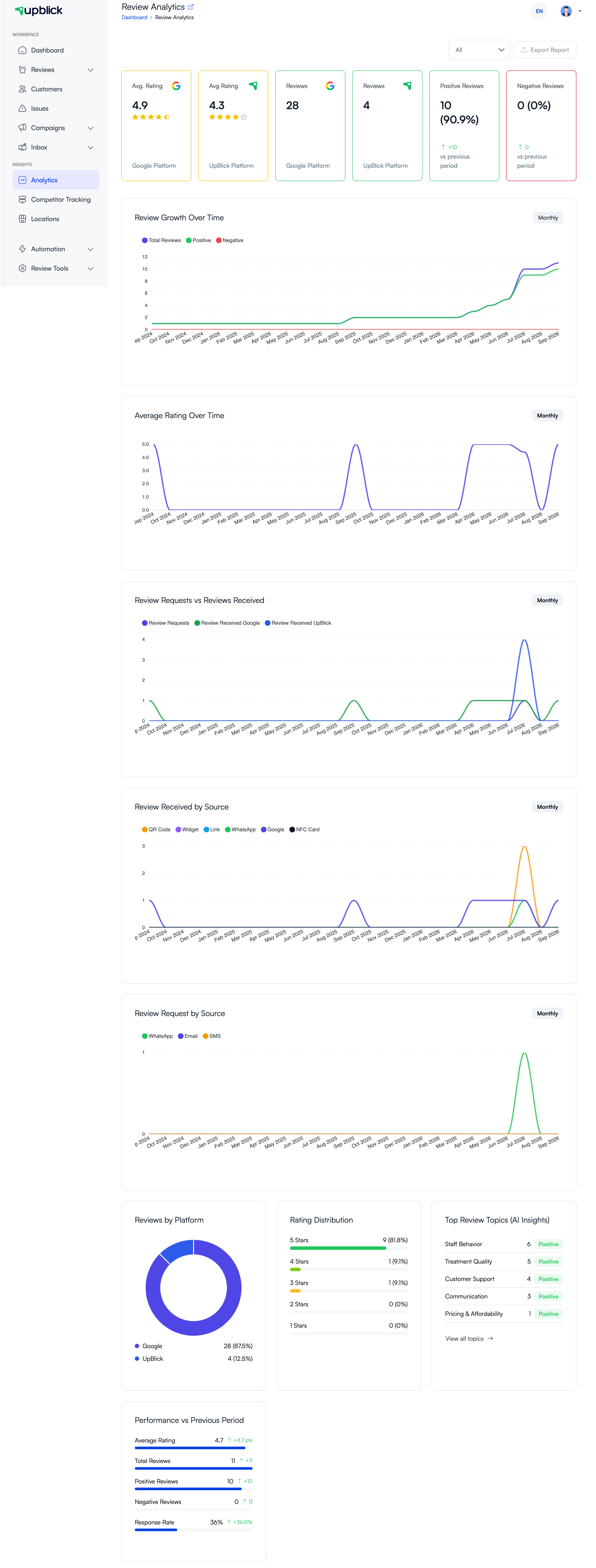
UpBlick Analytics helps you understand how reviews, customer feedback, and review requests are performing for each business location. Use it to spot trends, compare sources, and decide where to improve.
Analytics available in UpBlick
- Google and UpBlick average ratings and review totals.
- Positive and negative review counts.
- Review growth and average-rating trends over time.
- Review requests compared with reviews received.
- Review and request sources, including QR code, link, WhatsApp, Google, NFC, email, and SMS.
- Rating distribution, platform breakdown, and performance versus the previous period.
- AI-detected review topics, sentiment, and customer feedback themes.
Choose a location and period first
Analytics are location-specific. Select the correct location and use the date-range control before comparing results. Choose All when you need the full available history, or select a shorter period to focus on recent activity.
Related Articles
Turn every customer touchpoint into review growth
Use UpBlick to collect feedback, request Google reviews, recover bad experiences, and understand customer sentiment.
Need help with UpBlick?
Use these guides to set up review collection, customers, WhatsApp automation, issue recovery, and reporting.
Start growing reviews with UpBlick