How can I analyze my review trends over time?
Analytics & Business Insights
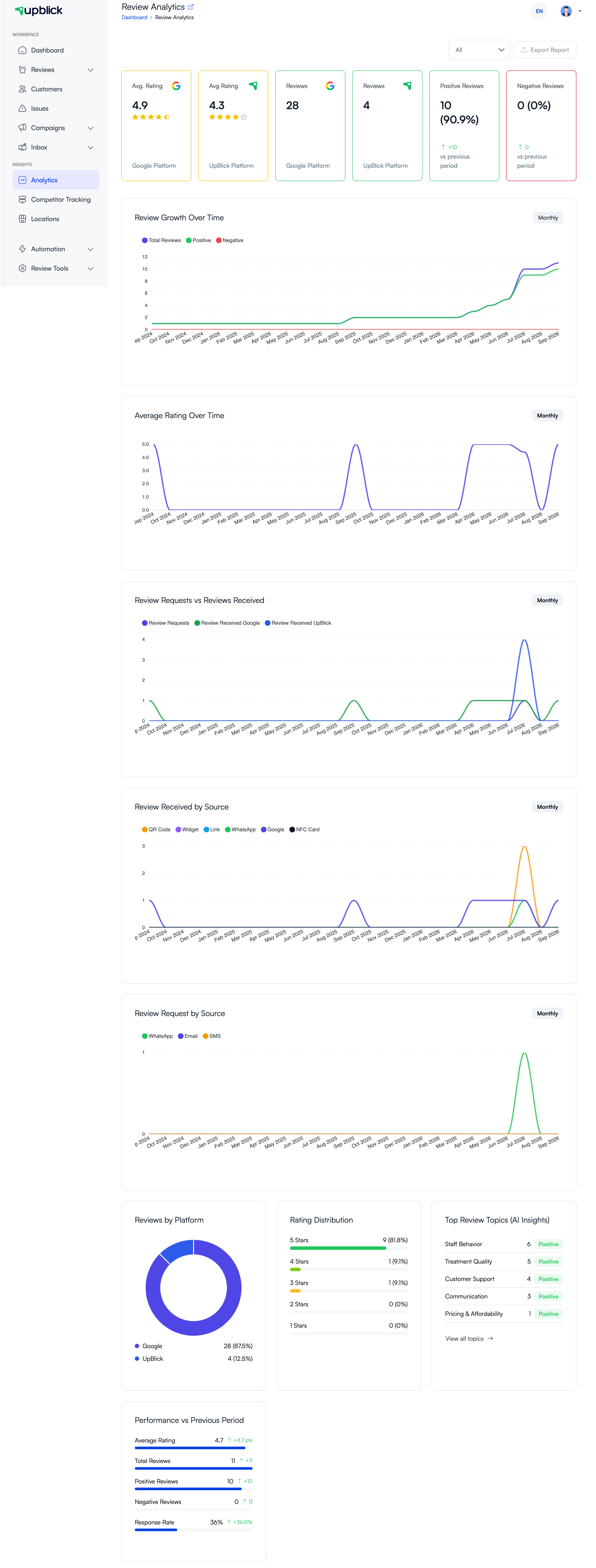
Trend charts show change over time. They are more useful than a single total when you want to understand whether review collection and customer experience are improving, staying flat, or declining.
Charts to use
- Review Growth Over Time: total, positive, and negative reviews.
- Average Rating Over Time: rating movement across the selected period.
- Review Requests vs Reviews Received: whether requests are producing customer responses and reviews.
- Review Received by Source: which collection channel contributes results.
- Review Request by Source: which communication channel sends requests.
How to interpret a change
Check several charts before drawing a conclusion. For example, a rise in requests without a rise in received reviews may mean that the request channel, timing, or customer experience needs attention. A rating change should be read with the review count and the underlying comments.
Related Articles
Turn every customer touchpoint into review growth
Use UpBlick to collect feedback, request Google reviews, recover bad experiences, and understand customer sentiment.
Need help with UpBlick?
Use these guides to set up review collection, customers, WhatsApp automation, issue recovery, and reporting.
Start growing reviews with UpBlick