How can I view business performance trends?
Analytics & Business Insights
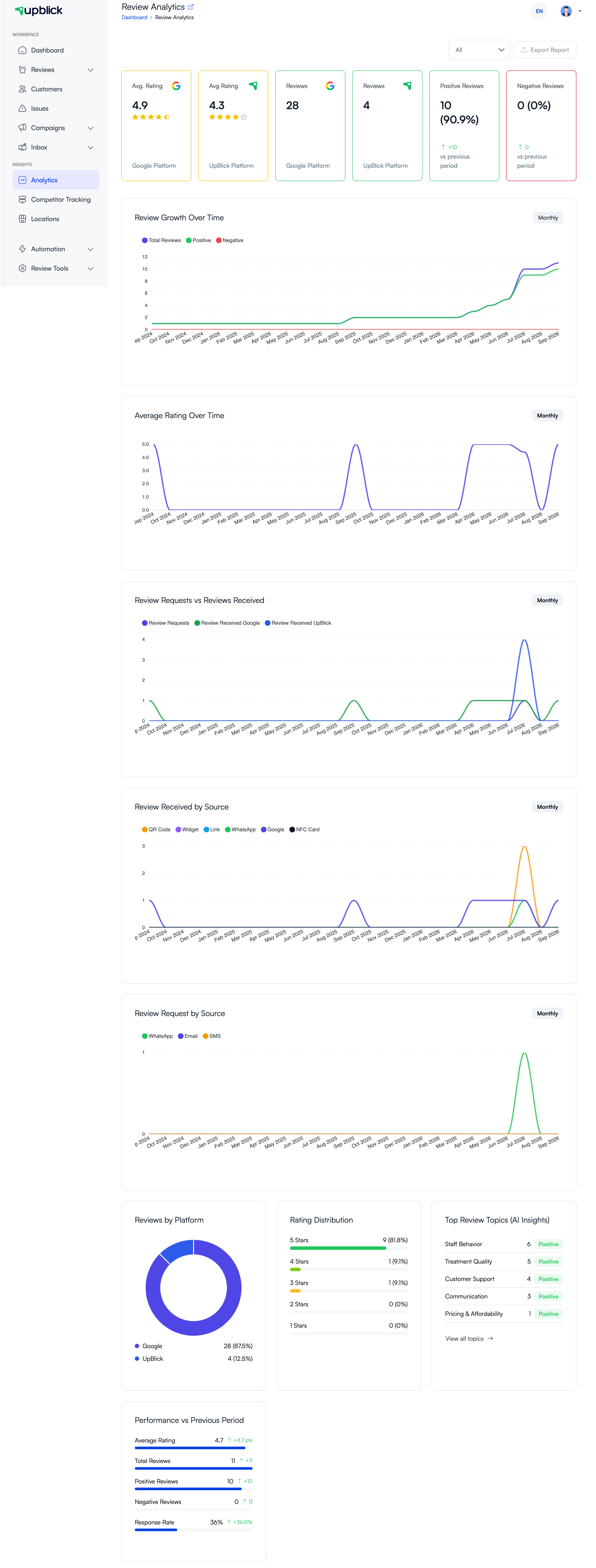
Business-performance trends show how your results change across a selected period. They are useful for checking the effect of a new process, campaign, service change, or review-request routine.
View trends
- Select the location you want to analyse.
- Open Analytics → Review Analytics.
- Select the date range and chart frequency when available.
- Review growth, rating, request, and source charts.
- Compare the current period with the previous-period indicators.
Make comparisons that are useful
Compare like with like. Use the same location, similar time periods, and enough review volume before deciding that a result is a meaningful change. When a trend changes, read recent reviews and topics to understand why.
Related Articles
Turn every customer touchpoint into review growth
Use UpBlick to collect feedback, request Google reviews, recover bad experiences, and understand customer sentiment.
Need help with UpBlick?
Use these guides to set up review collection, customers, WhatsApp automation, issue recovery, and reporting.
Start growing reviews with UpBlick