What Can Businesses Learn From Customer Feedback?
Reviews & Review Collection
Customer feedback helps businesses understand what customers experience before, during, and after a visit. In UpBlick, feedback can reveal what customers appreciate, what causes dissatisfaction, which locations need attention, and which changes could lead to better service and more positive reviews.
What feedback can teach your business
UpBlick helps organize customer feedback into signals your team can review and act on.
| Insight | What it helps you understand | Example action |
|---|---|---|
| Customer sentiment | Whether feedback is mostly positive, neutral, negative, or mixed. | Prioritize low-sentiment feedback for follow-up. |
| Business strengths | What customers consistently praise. | Use common praise in staff coaching, service standards, and marketing. |
| Recurring problems | What customers complain about repeatedly. | Fix process gaps such as wait times, billing confusion, or inconsistent quality. |
| Service performance | Which services, products, or visit types create the best or worst experiences. | Improve training, staffing, or service delivery for weak areas. |
| Location trends | How ratings, reviews, and issues change over time for each location. | Compare locations and support the teams that need extra attention. |
1. What customers like most
Positive feedback shows what your business should keep doing. UpBlick can help surface repeated praise such as friendly staff, fast service, clean facilities, product quality, communication, or value for money.
Use these strengths to reinforce good habits with your team. If several customers praise the same part of the experience, make that part of your standard operating process.
2. What needs improvement
Negative and mixed feedback shows where the customer experience breaks down. Common examples include long wait times, unclear pricing, poor follow-up, slow responses, parking issues, inconsistent product quality, or staff behavior concerns.
When a completed UpBlick feedback submission has a low rating, it can create an Issue so your team has a place to review, prioritize, and resolve the concern.
3. Which services create strong or weak experiences
If your feedback form asks what service the customer used, UpBlick can help connect feedback to specific services, products, treatments, or visit types. This makes the feedback more useful than a rating alone.
For example, a restaurant may learn that dine-in customers praise service speed while delivery customers mention packaging issues. A clinic may learn that consultation feedback is strong but follow-up communication needs work.
4. Which staff or teams are mentioned
If you enable the staff or team question, feedback can help identify where customers received good support or where coaching may be needed. Keep this information internal and use it responsibly.
Staff-related feedback is best used for training, recognition, and service improvement. Avoid asking customers to publicly mention private staff details unless that matches your business policy and privacy practices.
5. How customer experience changes over time
Feedback trends help you understand whether service improvements are working. Watch for changes in ratings, review volume, response rate, sentiment, and recurring issue themes after making operational changes.
6. Which customers may need follow-up
Customer feedback can help your team identify who may need attention after a poor or incomplete experience. Lower ratings, negative comments, and repeated complaints should be reviewed quickly.
A good follow-up should acknowledge the issue, avoid arguing with the customer, and focus on resolving the problem where possible.
7. How to improve future review requests
Feedback can show whether customers understand the review journey, whether request timing is effective, and whether reminders are helping. If many customers start but do not complete the journey, review your request timing, template wording, and reminder setup.
How to use feedback insights in UpBlick
- Select the business location you want to review.
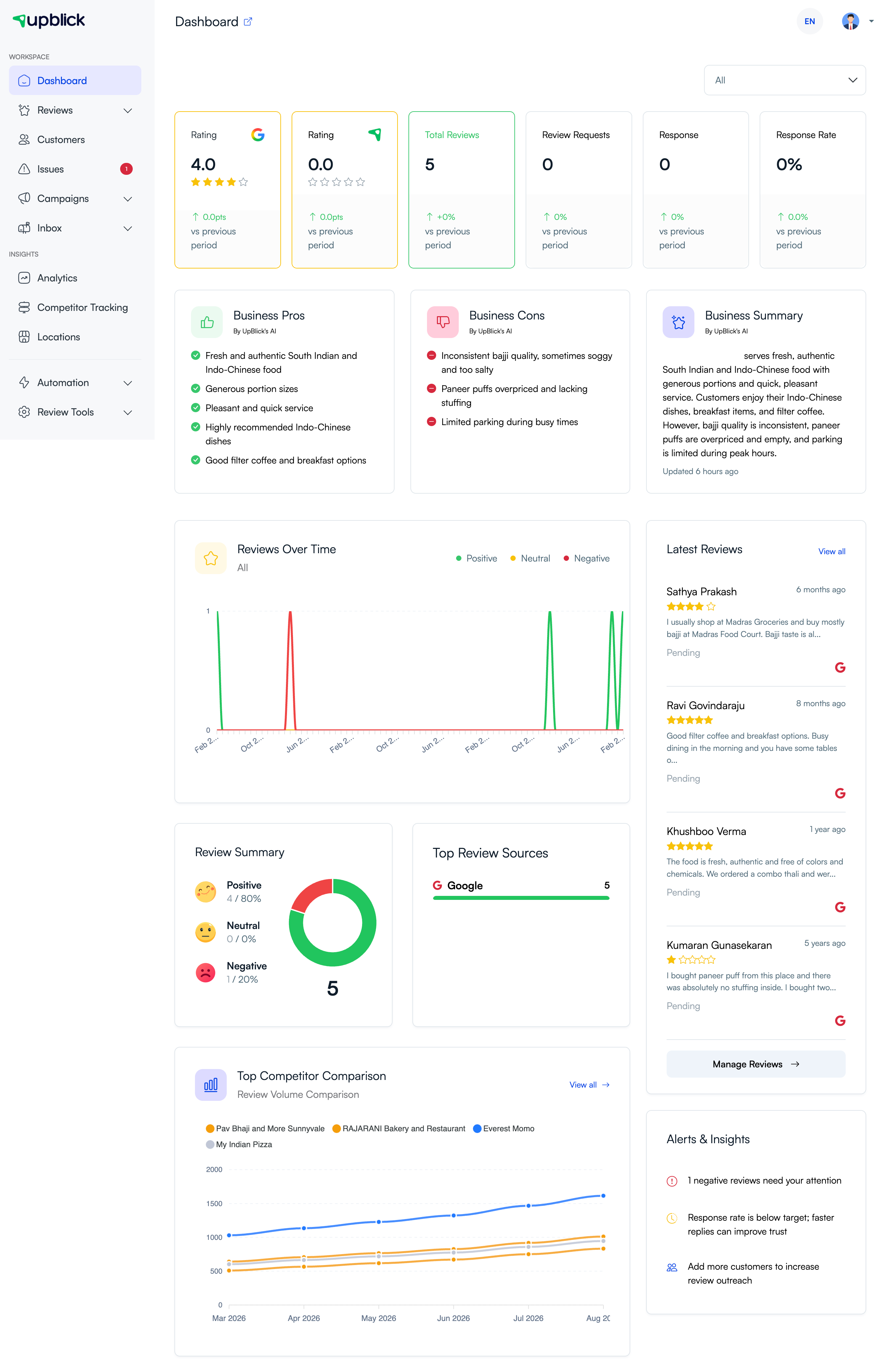
- Open the Dashboard to review ratings, summaries, trends, and alerts.
- Open Reviews to read individual customer reviews and feedback.
- Open Issues to review lower-rating concerns that need attention.
- Compare recurring strengths and complaints over time.
- Decide one or two operational improvements to make first.
- Continue collecting feedback to see whether the pattern improves.
Best practices
- Review feedback regularly instead of waiting for a crisis.
- Separate one-time complaints from repeated patterns.
- Use customer language when describing the issue internally.
- Share positive feedback with the team to reinforce good service.
- Assign ownership for recurring issues so they do not sit unresolved.
- Do not use feedback only to chase ratings. Use it to improve the customer experience.
- Keep customer privacy in mind when sharing feedback internally.
Troubleshooting
Frequently asked questions
Can customer feedback show why ratings changed?
Yes. Ratings show the score, while feedback text and selected answers explain what likely caused the score.
Should I act on every single comment?
Read every important comment, but prioritize repeated patterns, low-rating feedback, and issues that affect customer trust or service quality.
Can positive feedback be useful?
Yes. Positive feedback shows what customers value most and what your team should continue doing consistently.
Can feedback help train staff?
Yes. Use feedback to recognize strong service and coach recurring gaps. Keep customer and staff privacy in mind when sharing examples.
Does feedback automatically improve Google reviews?
No. Feedback gives you the information needed to improve service. Better experiences and timely review requests can lead to stronger review outcomes over time.
Related Articles
Turn every customer touchpoint into review growth
Use UpBlick to collect feedback, request Google reviews, recover bad experiences, and understand customer sentiment.
Need help with UpBlick?
Use these guides to set up review collection, customers, WhatsApp automation, issue recovery, and reporting.
Start growing reviews with UpBlick