What Campaign Types Does UpBlick Support?
Campaigns & Marketing
UpBlick supports campaign types that help your business send planned WhatsApp marketing messages to selected customers. The available campaign types appear as template cards inside the Campaigns area.
The exact options can depend on your active business location, connected messaging channel, selected language, and approved message templates.
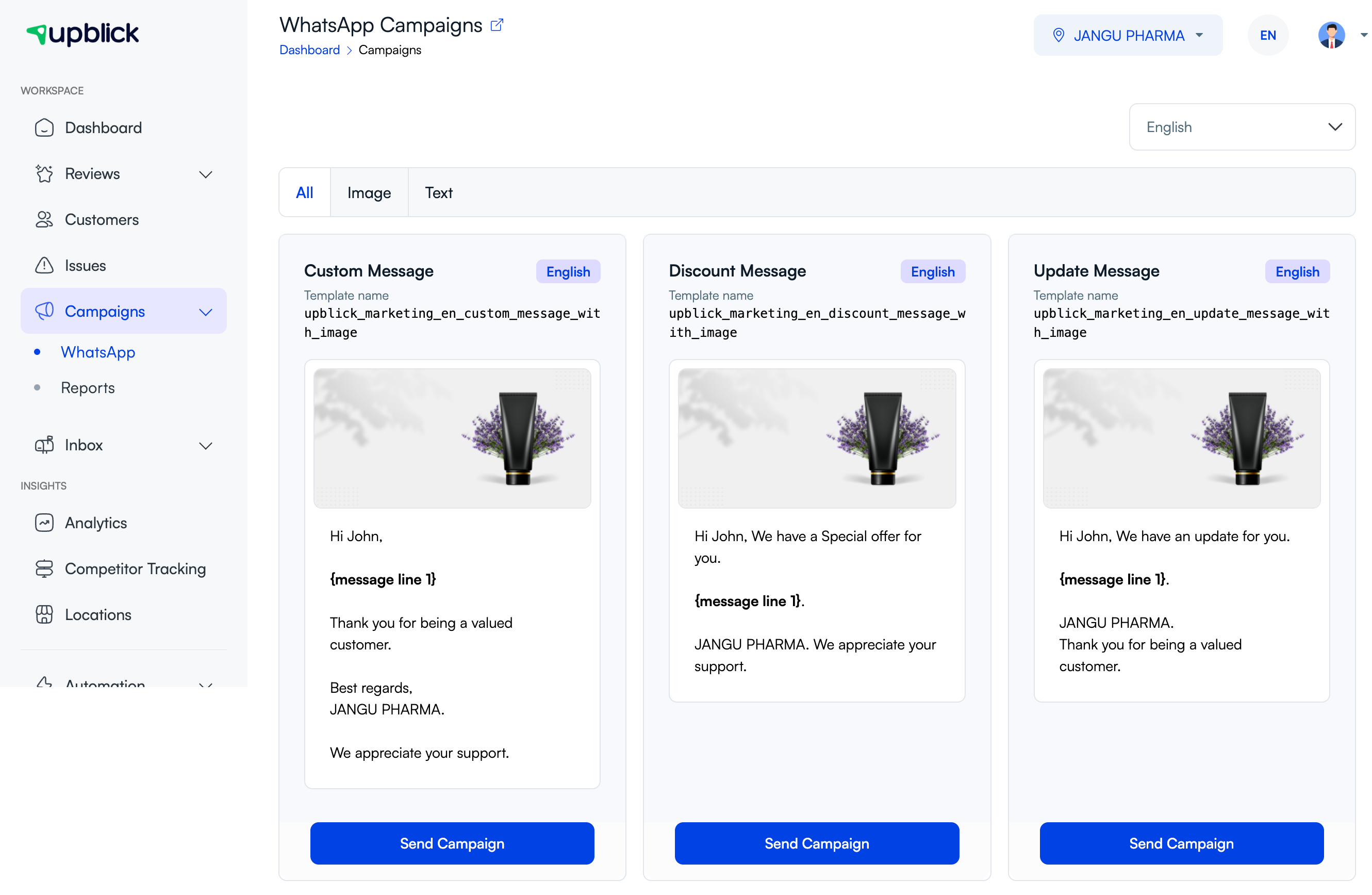
Supported campaign types
In the current campaign workflow, UpBlick commonly supports these campaign types:
- Custom Message: Use this when you want to send a general business message with your own content.
- Discount Message: Use this when you want to share an offer, discount, or promotional benefit.
- Update Message: Use this when you want to announce a business update, service update, availability change, or important notice.
Image and text campaign formats
Campaign templates may also be grouped by format:
- Image campaigns: These include a header image, such as a product, offer, announcement, or service visual.
- Text campaigns: These focus on written content and are useful when no image is needed.
Use the All, Image, and Text tabs to narrow the template list before choosing a campaign.
How to choose the right campaign type
| Goal | Recommended campaign type |
|---|---|
| Send a flexible message that does not fit a fixed offer or update. | Custom Message |
| Promote a sale, special price, coupon, or limited-time offer. | Discount Message |
| Inform customers about a launch, change, new arrival, or business notice. | Update Message |
| Show a product, service, event, or offer visually. | Image campaign |
| Send a simple announcement without media. | Text campaign |
What each campaign type includes
Each campaign type is based on a message template. Depending on the template, you may need to complete:
- A campaign name for internal tracking.
- The audience that should receive the campaign.
- A header image when the template supports one.
- Custom message text in the available message fields.
- Sending preference, such as sending immediately or scheduling later.
Important notes
- Only approved and available templates can be used for campaigns.
- Some campaign types may appear only for certain languages or business locations.
- Only customers with suitable contact details and required consent should be selected.
- Template text may have fixed parts that cannot be fully changed.
- Reports are available after campaigns are sent, so you can review delivery and engagement.
Frequently asked questions
Can I create my own campaign type?
You can choose from the campaign templates available in UpBlick and customize the allowed message fields. New template availability depends on your account setup and approval requirements.
Can I send a campaign with an image?
Yes, when you choose an image-based campaign template. Upload a clear header image and review the preview before sending.
Can I send only text?
Yes, when a text-based template is available. Text campaigns are useful for simple updates that do not need a visual.
Why do I see fewer campaign types than expected?
The visible campaign types can change based on location, language, connected channel, approved templates, and account configuration.
Related Articles
Turn every customer touchpoint into review growth
Use UpBlick to collect feedback, request Google reviews, recover bad experiences, and understand customer sentiment.
Need help with UpBlick?
Use these guides to set up review collection, customers, WhatsApp automation, issue recovery, and reporting.
Start growing reviews with UpBlick