How to Handle Negative Customer Feedback?
Reviews & Review Collection
Negative customer feedback should be handled quickly, calmly, and consistently. In UpBlick, lower-rating feedback can appear as an Issue so your team can review the concern, track follow-up progress, and resolve the problem where possible.
Open Issues
- Sign in to UpBlick.
- Select the business location you want to review.
- Open Issues from the sidebar.
- Use the status cards and filters to review open, in-progress, resolved, and unresolved concerns.
- Select the issue you want to inspect or follow up on.
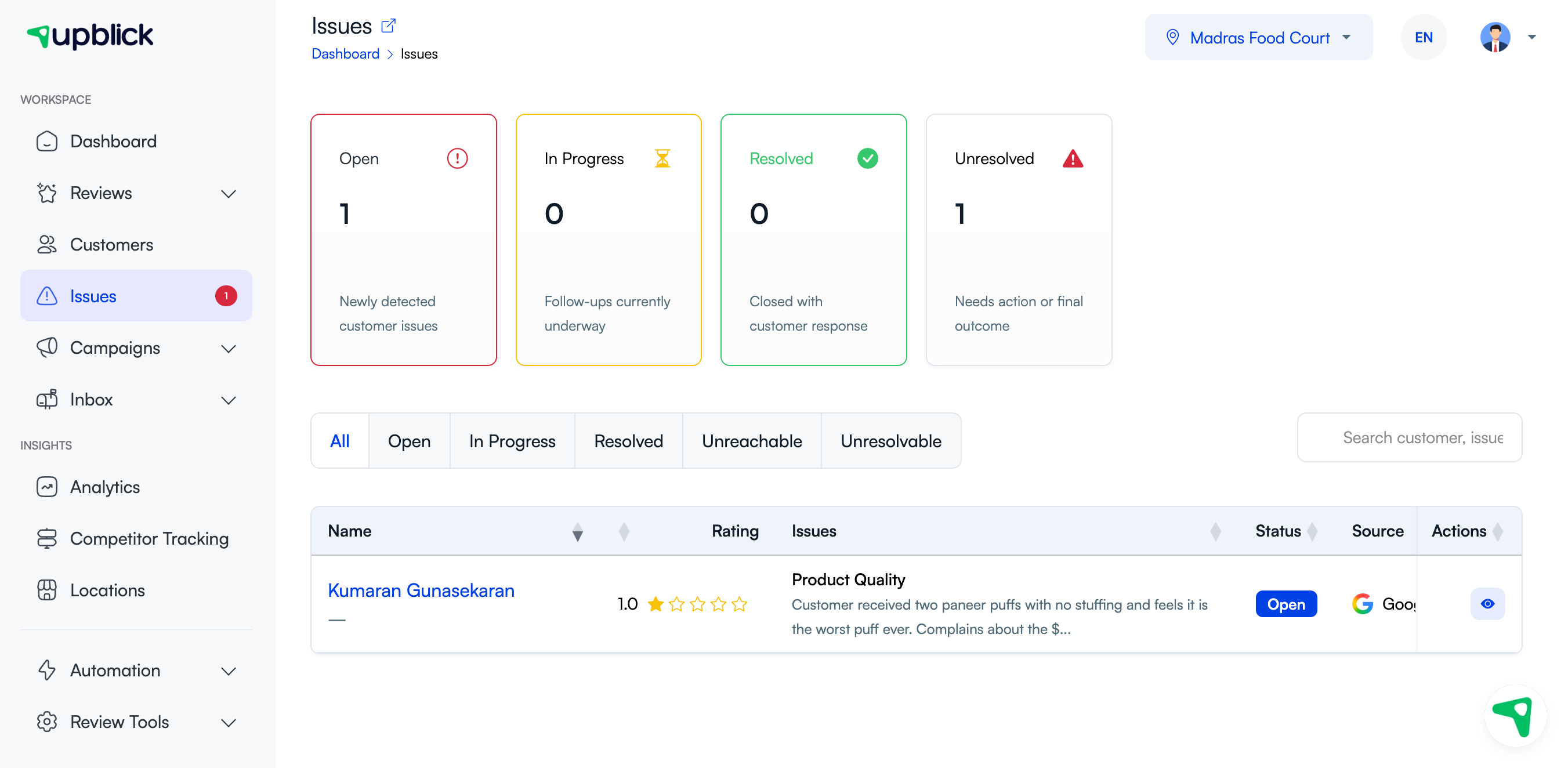
How UpBlick helps with negative feedback
| Area | What it shows | How to use it |
|---|---|---|
| Status cards | Open, in-progress, resolved, and unresolved issue counts. | See how many customer concerns need action. |
| Status filters | All, Open, In Progress, Resolved, Unreachable, and Unresolvable filters. | Focus on the issues your team needs to handle first. |
| Issue category | The likely customer concern, such as product quality or service experience. | Group similar issues and spot recurring patterns. |
| Rating and source | The customer rating and where the feedback came from. | Understand severity and context before responding. |
| Actions | Options to view or manage the customer issue. | Open the issue details before deciding the next step. |
Recommended process
- Read the full customer feedback or review.
- Check the rating, source, date, and issue category.
- Decide whether the issue needs immediate follow-up.
- Move the issue to In Progress when someone starts handling it.
- Contact the customer through an appropriate channel when follow-up is needed.
- Document the outcome or next step.
- Mark the issue Resolved, Unreachable, or Unresolvable based on the final status.
Prioritize urgent feedback first
Start with feedback that may affect trust, safety, payments, service delivery, or public reputation. Recent low-rating reviews should usually be reviewed before older, less specific comments.
Prioritize issues that include:
- 1-star or 2-star ratings.
- Specific complaints about staff behavior, quality, billing, delays, or cleanliness.
- Repeat complaints from multiple customers.
- Concerns that may require a direct customer follow-up.
- Public Google reviews that need a careful response.
Respond with empathy
When replying to a negative review or feedback item, acknowledge the concern and keep the tone calm. Avoid arguing with the customer, blaming them, or sharing private details publicly.
A helpful response usually includes:
- A short thank-you for the feedback.
- Acknowledgement of the customer’s concern.
- A simple apology or regret when appropriate.
- A practical next step, such as contacting your team.
- A commitment to review the issue internally.
Use AI responses carefully
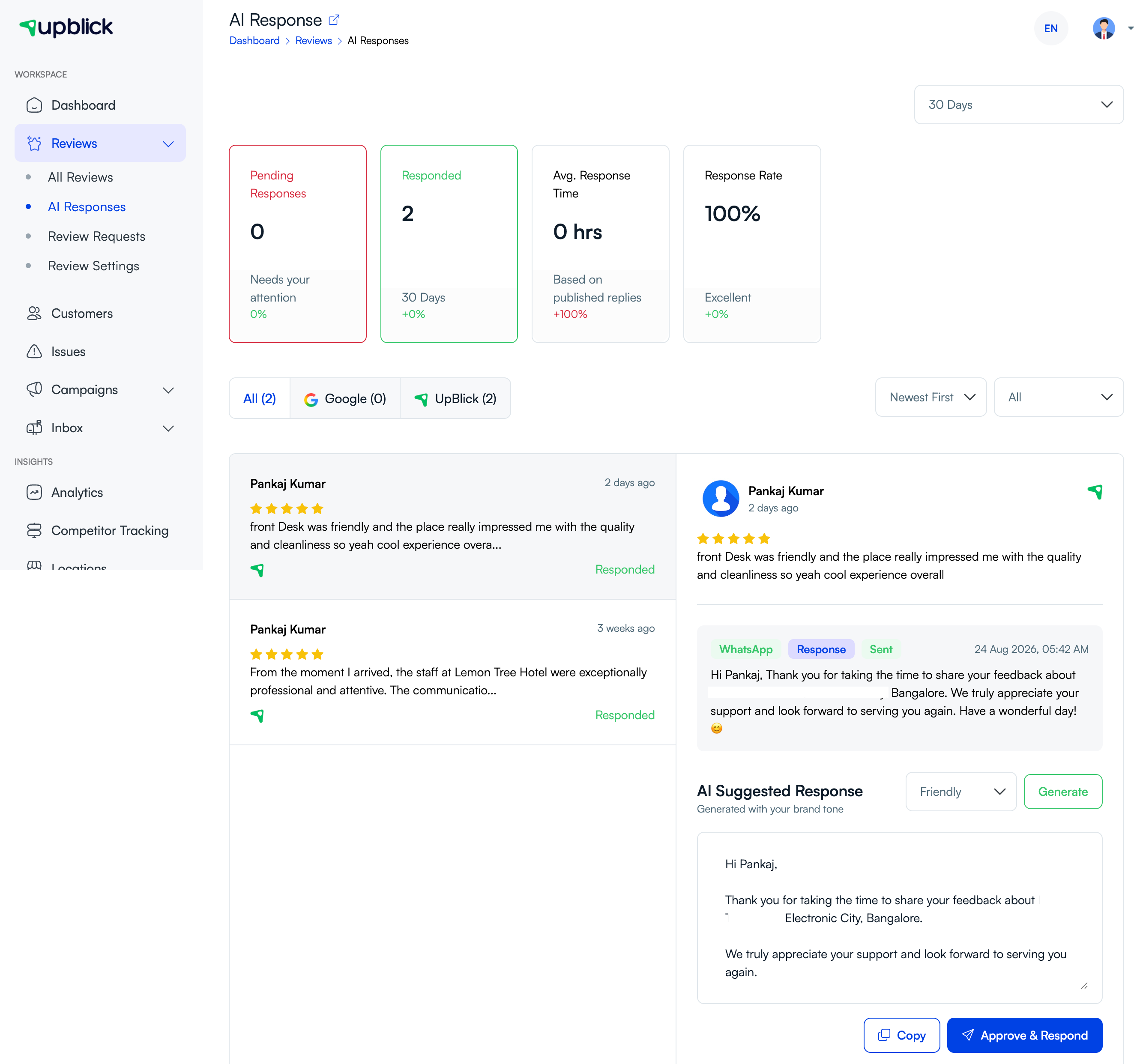
If you use AI-assisted responses, generate a draft and then edit it for accuracy, tone, and context. Negative feedback often needs a more thoughtful response than a generic apology.
Track the outcome
After follow-up, update the issue status so your team can see what happened. Use statuses consistently:
- Open: the issue is new and needs review.
- In Progress: someone is actively handling the concern.
- Resolved: the concern was handled with a customer response or clear outcome.
- Unreachable: the team attempted follow-up but could not reach the customer.
- Unresolvable: the concern cannot be resolved through the available process.
Learn from recurring issues
If the same complaint appears repeatedly, treat it as a process issue. Review the service step, staff handoff, timing, product quality, billing process, or communication that may be creating the repeated problem.
Use the pattern to improve operations, then continue monitoring whether similar complaints decrease over time.
Best practices
- Respond quickly, especially to recent low-rating reviews.
- Read the full customer message before taking action.
- Keep public responses short, respectful, and privacy-safe.
- Move detailed conversations to a private support channel when appropriate.
- Assign ownership so issues do not remain open without action.
- Use repeated complaints to improve the business process.
- Do not pressure customers to change or remove honest feedback.
Troubleshooting
Frequently asked questions
Does every negative review become an Issue?
Not always. Issues depend on the source, rating, completed feedback journey, and the workflow configured for the location.
Should I respond publicly to negative Google reviews?
In most cases, yes. Keep the response respectful, avoid private details, and invite the customer to continue the conversation through an appropriate support channel.
Can UpBlick remove a negative Google review?
No. Google controls Google Reviews. UpBlick can help you understand and respond to feedback, but it cannot remove Google reviews.
Can I ask a customer to change their review?
Do not pressure customers to change honest feedback. Focus on resolving the issue and improving the customer experience.
When should I mark an issue as resolved?
Mark an issue as resolved when your team has reviewed the concern, completed the appropriate follow-up, and documented the outcome.
Related Articles
Turn every customer touchpoint into review growth
Use UpBlick to collect feedback, request Google reviews, recover bad experiences, and understand customer sentiment.
Need help with UpBlick?
Use these guides to set up review collection, customers, WhatsApp automation, issue recovery, and reporting.
Start growing reviews with UpBlick