How Does UpBlick Understand Customer Sentiment?
Reviews & Review Collection
UpBlick understands customer sentiment by looking at the rating, feedback answers, written review text, and recurring language patterns across a location. It then groups feedback into useful signals such as positive themes, negative concerns, issue priority, and business summaries.
What customer sentiment means
Customer sentiment is the tone and meaning behind customer feedback. It helps answer questions such as:
- Was the customer happy, neutral, or unhappy?
- What part of the experience shaped that feeling?
- Is the comment about staff, service speed, quality, price, cleanliness, or another theme?
- Does the feedback need a quick follow-up?
- Is the same issue appearing across multiple customers?
Signals UpBlick can use
UpBlick can use several pieces of feedback context when sentiment is available.
| Signal | How it helps |
|---|---|
| Star rating | Gives the clearest first indicator of whether the experience was positive, neutral, or negative. |
| Selected feedback answers | Shows which services, highlights, or team interactions influenced the experience. |
| Written review text | Provides the customer’s own words, including praise, complaints, and specific details. |
| Business and location context | Helps connect feedback to the right location, category, services, and customer journey. |
| Repeated themes | Helps identify patterns that appear across multiple reviews or feedback submissions. |
How UpBlick classifies sentiment
UpBlick combines rating signals with the meaning of the customer’s feedback. A high rating with praise is usually positive. A low rating with a complaint is usually negative. Mixed comments may be neutral or may include both positive and negative themes.
For example, a customer might say the food was excellent but the waiting time was too long. UpBlick can treat the overall feedback as mixed while still recognizing separate themes: quality as a strength and speed as an area to improve.
Where sentiment appears in UpBlick
Sentiment can support several areas of the product:
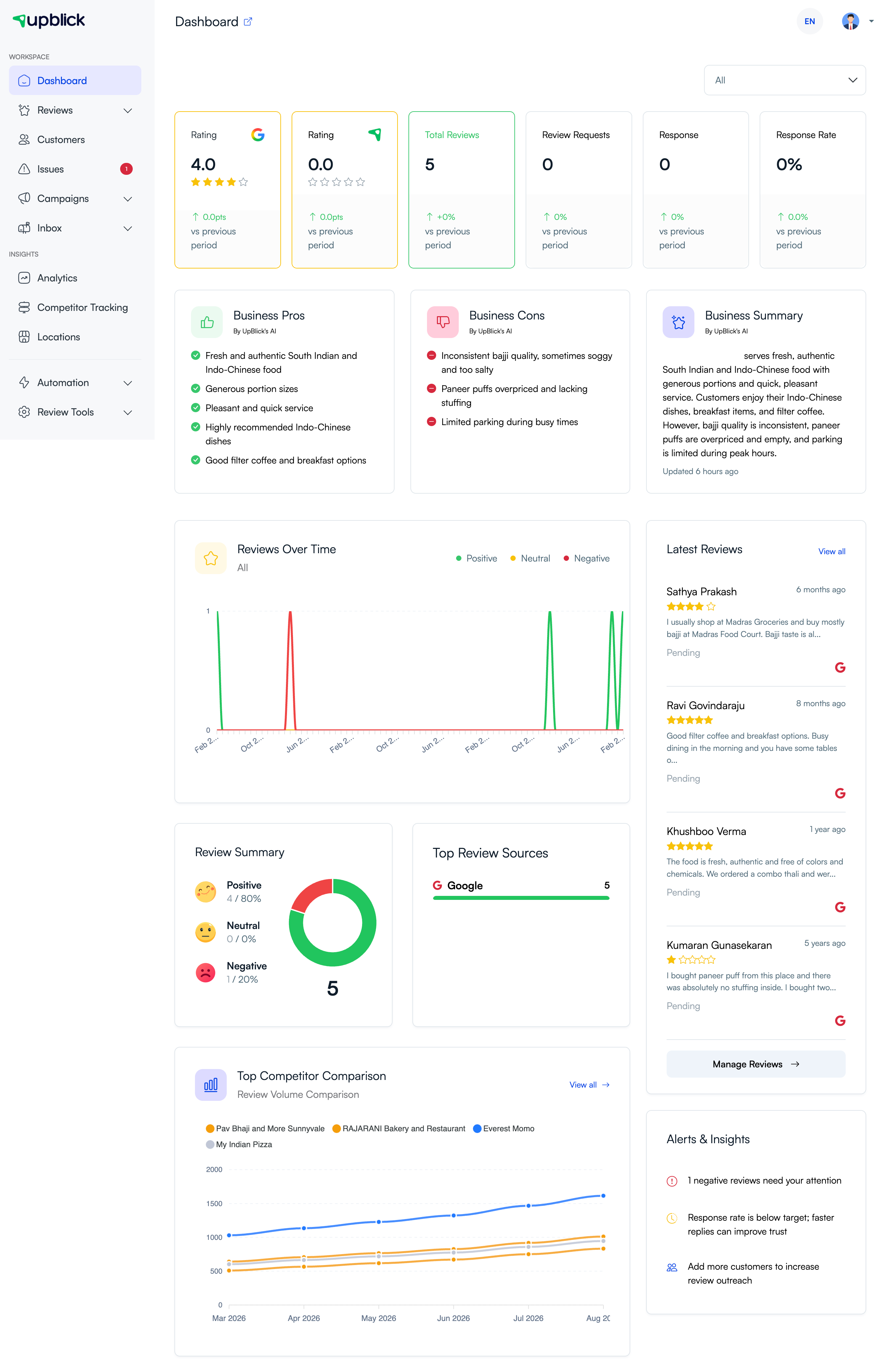
- Dashboard insights: business pros, business cons, summaries, trends, and alerts.
- Review summaries: positive, neutral, and negative review breakdowns.
- Issues: lower-rating submissions can be converted into follow-up items for the team.
- Review requests: request analytics can show how many customers progress through the review journey.
- Location reporting: themes can be compared across locations when enough data is available.
How lower ratings become actionable
When a completed UpBlick feedback submission has a rating below 4 stars, UpBlick can create an Issue for the location. AI analysis can help summarize the concern, identify the likely category, estimate sentiment, and assign a suggested priority.
This gives the team a structured place to review the concern, follow up with the customer when appropriate, and track the resolution.
What sentiment can help you learn
Sentiment analysis is most useful when you look for patterns instead of reacting to a single comment. It can help you identify:
- Services customers mention most often.
- Staff or departments that receive frequent praise.
- Operational problems such as delays, cleanliness concerns, billing confusion, or inconsistent quality.
- Positive themes that can be highlighted in training or marketing.
- Negative themes that need process improvements.
- Locations that need extra attention compared with other branches.
How to improve sentiment accuracy
- Ask short, clear feedback questions.
- Use answer options that match the real services at the location.
- Keep service, staff, and highlight options specific and non-overlapping.
- Encourage customers to write honest feedback in their own words.
- Review negative or mixed feedback manually before responding.
- Update feedback form options when your business changes services, teams, or processes.
- Avoid asking leading questions that push customers toward only positive answers.
What sentiment analysis does not do
UpBlick sentiment analysis does not replace human judgment. It also does not guarantee that every short, vague, sarcastic, or mixed comment will be interpreted perfectly.
Use sentiment as a fast way to prioritize attention, then read the original customer words before deciding how to respond or what to change.
Troubleshooting
Frequently asked questions
Does UpBlick read every customer comment?
UpBlick can analyze completed feedback and available review text to identify sentiment, themes, summaries, and issues.
Is sentiment based only on star ratings?
No. Star ratings are important, but written feedback and selected answers add context. A rating and comment together usually provide a clearer signal than either one alone.
Can one review contain both positive and negative sentiment?
Yes. A customer can praise one part of the experience and complain about another. UpBlick can use that mixed context when creating summaries and identifying themes.
Does sentiment analysis respond to customers automatically?
No. Sentiment can help prioritize and summarize feedback, but your team should review the feedback and choose the right response.
Can sentiment insights improve Google reviews?
Yes. When you understand common praise and complaints, you can improve the customer experience and make future review requests more effective.
Related Articles
Turn every customer touchpoint into review growth
Use UpBlick to collect feedback, request Google reviews, recover bad experiences, and understand customer sentiment.
Need help with UpBlick?
Use these guides to set up review collection, customers, WhatsApp automation, issue recovery, and reporting.
Start growing reviews with UpBlick