Does UpBlick Replace Google Reviews?
Reviews & Review Collection
No. UpBlick does not replace Google Reviews. UpBlick works alongside Google Reviews by helping businesses collect customer feedback, send review requests, guide customers to the correct Google review page, and learn from review activity.
How UpBlick and Google Reviews work together
Think of UpBlick as the review collection and customer feedback layer. Google is the public review platform where the final Google review is submitted and displayed.
| UpBlick helps with | Google controls |
|---|---|
| Sending review requests through available channels. | The Google review form and final review submission. |
| Collecting customer feedback before the Google step when configured. | Whether a Google review appears publicly. |
| Opening the saved Google Review Link for the selected location. | Google account sign-in and review processing. |
| Suggesting editable review drafts based on customer feedback. | The customer’s final rating and review text on Google. |
| Tracking request activity, sentiment, issues, and insights. | Google Business Profile ranking, filtering, and display rules. |
What UpBlick can do
- Help you ask customers for feedback and reviews.
- Send customers to the correct Google review page using your saved Google Review Link.
- Let customers answer feedback questions before continuing to Google.
- Suggest editable review drafts based on the customer’s own feedback.
- Track review request activity and reminders.
- Help identify customer sentiment, business strengths, recurring complaints, and issues.
- Help your team respond to customer feedback faster and more consistently.
What UpBlick cannot do
- Post a Google review for a customer.
- Force a customer to leave a Google review.
- Choose the customer’s star rating.
- Guarantee more Google reviews or a higher Google rating.
- Guarantee that Google will show a submitted review publicly.
- Remove or hide a negative Google review.
- Replace your Google Business Profile.
What the customer experiences
When your workflow includes feedback collection, the customer can rate their experience and answer simple questions in UpBlick before continuing.

If AI-assisted drafts are enabled, the customer can choose a suggested draft, edit it, or write their own review text.
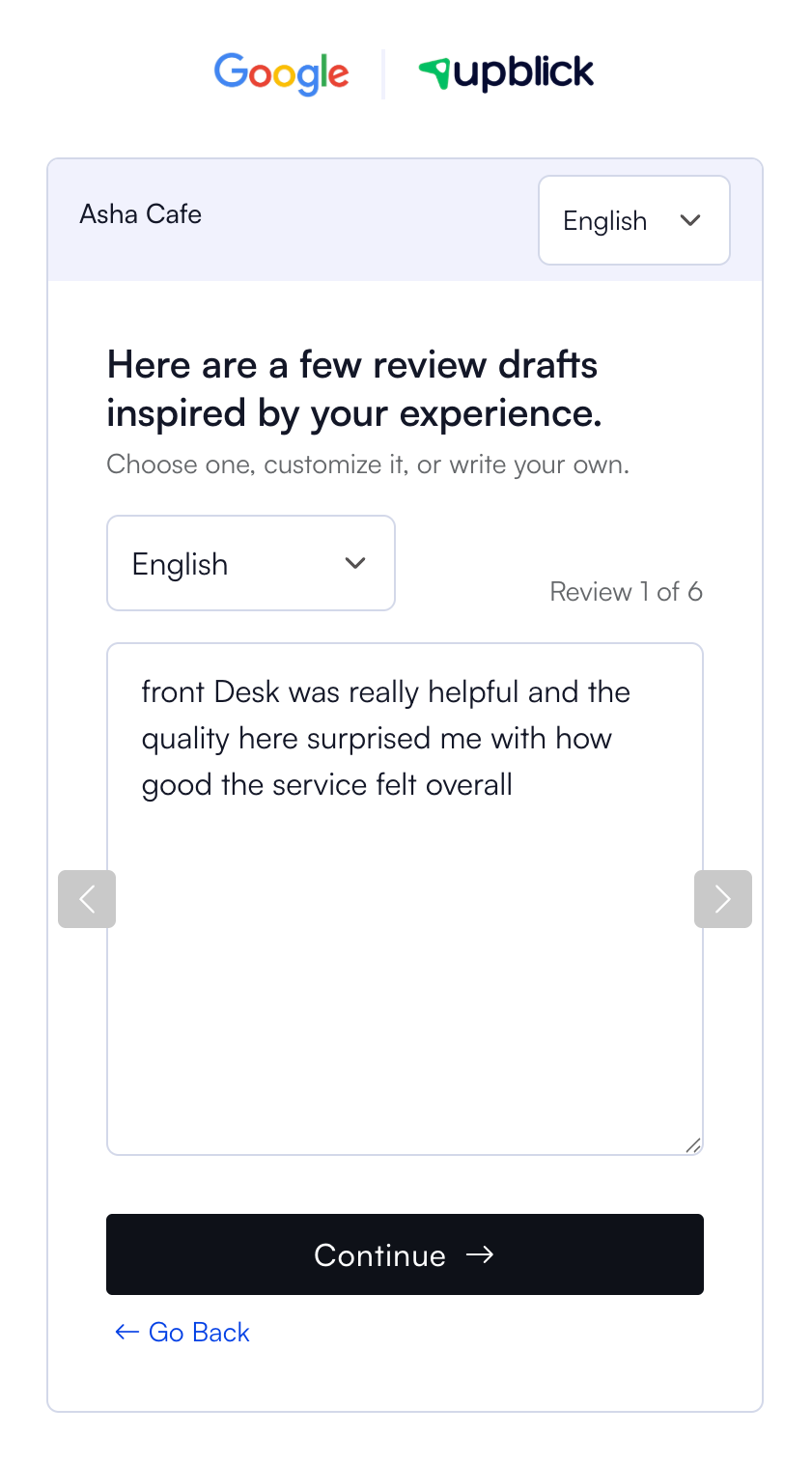
When the flow includes a Google step, the customer can select Share on Google. UpBlick then opens the saved Google Review Link for that location.

Why businesses use UpBlick with Google Reviews
Businesses use UpBlick because collecting reviews is more than sharing a Google link. UpBlick helps organize the full process around customer feedback, request timing, reminders, QR codes, NFC cards, team follow-up, and insights.
This helps the business improve the customer experience that leads to better reviews over time.
How to keep the Google connection accurate
- Add each business location to UpBlick.
- Save the correct Google Review Link for each location.
- Choose the review collection mode that matches your workflow.
- Test the customer journey from a link, QR code, or NFC card.
- Confirm that the Google step opens the correct business listing.
- Monitor review requests, feedback, issues, and dashboard insights.
Best practices
- Ask customers for honest feedback and reviews.
- Do not ask only satisfied customers to leave Google reviews.
- Do not offer incentives for a specific rating or positive review.
- Use customer feedback to fix real service problems.
- Respond to negative feedback with empathy and useful next steps.
- Test Google Review Links regularly, especially for multi-location accounts.
- Keep UpBlick and Google Business Profile location details aligned.
Troubleshooting
Frequently asked questions
Is UpBlick a Google Reviews replacement?
No. UpBlick is a review collection and feedback platform that works with your Google Review Link.
Can UpBlick publish reviews directly to Google?
No. Customers must submit their own reviews on Google.
Can UpBlick guarantee that Google will show a review?
No. Google controls review processing, filtering, and public display.
Can UpBlick help businesses get more Google reviews?
Yes. UpBlick can reduce friction by sending review requests, offering QR and NFC review tools, and guiding customers to the correct Google review page.
Should I still manage my Google Business Profile?
Yes. Keep your Google Business Profile accurate and active. UpBlick works alongside it, not instead of it.
Related Articles
Turn every customer touchpoint into review growth
Use UpBlick to collect feedback, request Google reviews, recover bad experiences, and understand customer sentiment.
Need help with UpBlick?
Use these guides to set up review collection, customers, WhatsApp automation, issue recovery, and reporting.
Start growing reviews with UpBlick