मैं कौन सी ग्राहक गतिविधि देख सकता हूँ?
ग्राहकों
अपब्लिक ग्राहक गतिविधि आपकी टीम को यह समझने में मदद करती है कि किसी ग्राहक ने समय के साथ आपके व्यवसाय के साथ कैसे इंटरैक्ट किया है। आप अगली कार्रवाई करने से पहले समीक्षाओं, फीडबैक, संचार इतिहास, अंतिम इंटरैक्शन समय, भावना और अन्य रिकॉर्ड विवरणों की समीक्षा करने के लिए इसका उपयोग कर सकते हैं।
जहां ग्राहक गतिविधि दिखाई देती है
खुला ग्राहकों, ग्राहक ढूंढें, और ग्राहक विवरण पृष्ठ खोलें। ग्राहक विवरण दृश्य जैसे टैब के साथ सारांश जानकारी को जोड़ता है समीक्षाएं, प्रतिक्रिया, नोट्स, फ़ाइलें, संचार, और गतिविधि.
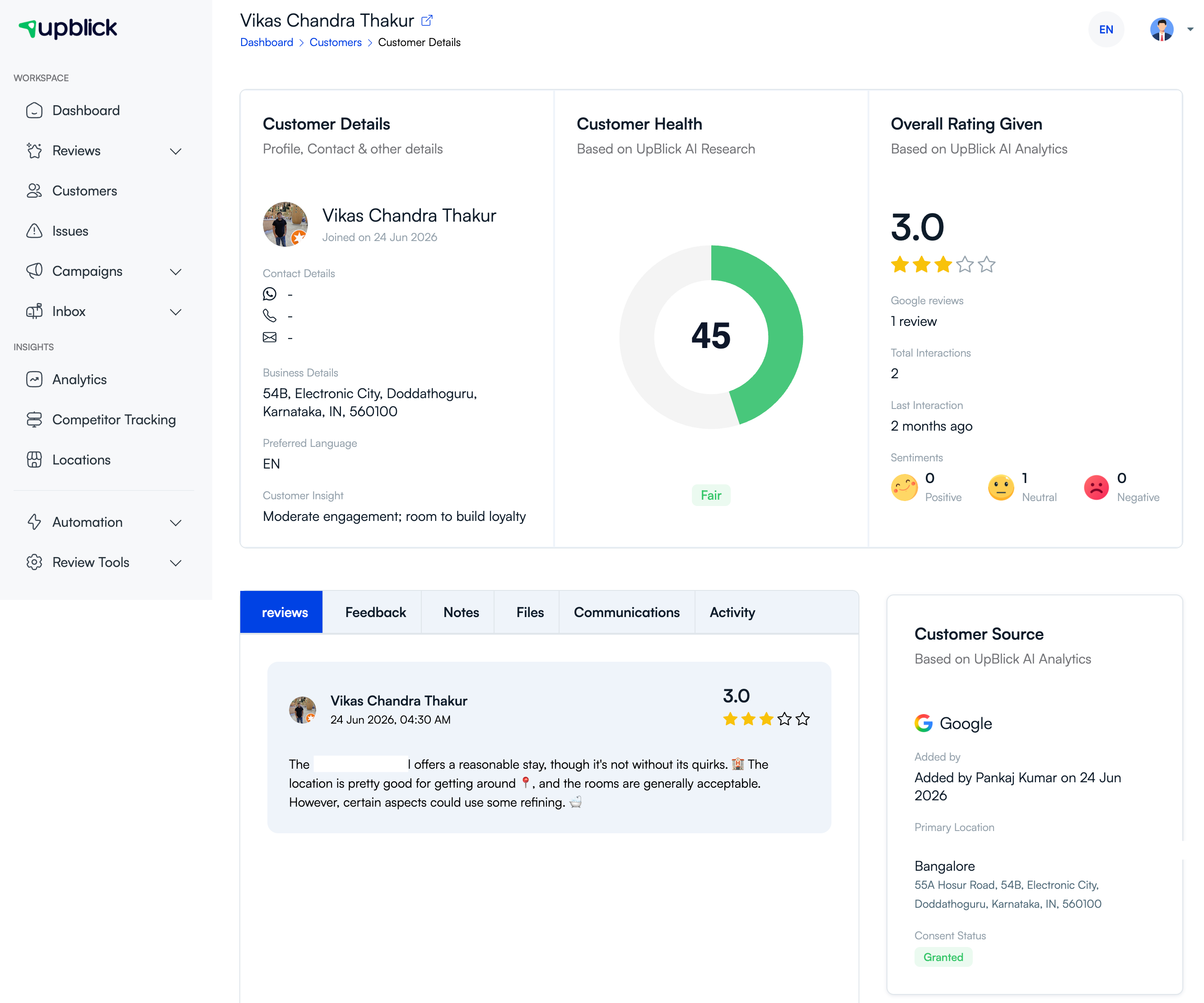
ग्राहक गतिविधि आप देख सकते हैं
| गतिविधि प्रकार | यह क्या दिखाता है | यह मदद क्यों करता है |
|---|---|---|
| ग्राहक प्रोफ़ाइल | नाम, शामिल होने की तारीख, संपर्क विवरण, पसंदीदा भाषा और व्यवसाय विवरण। | फ़ॉलो-अप से पहले आपको सही रिकॉर्ड की पुष्टि करने में मदद करता है। |
| समग्र रेटिंग | दी गई रेटिंग, समीक्षा संख्या, अंतिम इंटरैक्शन और भावना सारांश। | दिखाता है कि ग्राहक ने समय के साथ कैसी रेटिंग दी है या प्रतिक्रिया दी है। |
| समीक्षाएं | पाठ, रेटिंग, समीक्षा तिथि और स्रोत की समीक्षा करें। | आपकी टीम को उस ग्राहक की सार्वजनिक प्रतिक्रिया को समझने में मदद करता है। |
| प्रतिक्रिया | अपब्लिक समीक्षा यात्रा के दौरान फीडबैक एकत्र किया गया। | दिखाता है कि ग्राहक ने समीक्षा से पहले या उसके साथ क्या साझा किया है। |
| संचार | अनुरोधों, अनुस्मारक, धन्यवाद संदेश, या अन्य अनुवर्ती संचार की समीक्षा करें। | डुप्लिकेट या खराब समय पर आउटरीच से बचने में मदद करता है। |
| गतिविधि समयरेखा | समय-समय पर ग्राहक की गतिविधियां और इंटरैक्शन। | कार्रवाई करने से पहले आपको घटनाओं का क्रम देखने में मदद मिलती है। |
| स्रोत और सहमति | ग्राहक को कैसे जोड़ा गया, प्राथमिक स्थान और उपलब्ध होने पर सहमति की स्थिति। | आपकी टीम को यह पुष्टि करने में मदद करता है कि आउटरीच उचित है या नहीं। |
ग्राहक गतिविधि का उपयोग कैसे करें
- जांचें कि ग्राहक को पहले ही समीक्षा अनुरोध प्राप्त हुआ है या नहीं।
- प्रतिक्रिया देने या आगे बढ़ने से पहले पिछली प्रतिक्रिया की समीक्षा करें।
- देखें कि आखिरी बातचीत कब हुई थी।
- रिमाइंडर भेजने से पहले भावना और रेटिंग की जांच करें।
- ग्राहक से दोबारा संपर्क करने से पहले सहमति स्थिति की समीक्षा करें।
- स्रोत डेटा उपलब्ध होने पर समझें कि ग्राहक आयात, मैन्युअल प्रविष्टि, गूगल या किसी अन्य स्रोत से आया है या नहीं।
ग्राहक गतिविधि क्यों मायने रखती है
ग्राहक गतिविधि आपकी टीम को अधिक संदर्भ के साथ कार्य करने में मदद करती है। यह अनुमान लगाने के बजाय कि क्या किसी ग्राहक से पहले ही संपर्क किया गया था या क्या उनका अनुभव खराब था, आप पहले रिकॉर्ड की जांच कर सकते हैं और एक अधिक उपयुक्त अगला कदम चुन सकते हैं।
उपयोगी गतिविधि जांच के उदाहरण
- रिमाइंडर भेजने से पहले, जांच लें कि हालिया समीक्षा अनुरोध पहले से मौजूद है या नहीं।
- नई समीक्षा मांगने से पहले, जांच लें कि क्या ग्राहक ने पहले ही व्यवसाय की समीक्षा कर ली है।
- किसी शिकायत का जवाब देने से पहले, फीडबैक और संचार इतिहास की समीक्षा करें।
- फ़ोन नंबर या ईमेल का उपयोग करने से पहले, पुष्टि करें कि यह वर्तमान है और सहमति अभी भी वैध है।
सर्वोत्तम प्रथाएं
- फ़ॉलो-अप से पहले ग्राहक की अंतिम बातचीत की समीक्षा करें।
- गतिविधि और संचार का एक साथ उपयोग करें ताकि आप ग्राहक को अनावश्यक रूप से दो बार संदेश न भेजें।
- उत्तर देने से पहले संदर्भ को समझने के लिए समीक्षा और फीडबैक इतिहास का उपयोग करें।
- आउटरीच से पहले स्रोत और सहमति विवरण की जांच करें।
- ग्राहक संपर्क विवरण अपडेट रखें ताकि गतिविधि उपयोगी बनी रहे।
समस्या निवारण
अक्सर पूछे जाने वाले प्रश्नों
क्या मैं देख सकता हूं कि किसी ग्राहक ने कोई समीक्षा छोड़ी है?
हाँ। ग्राहक विवरण पृष्ठ का उपयोग करें और खोलें समीक्षाएं उस ग्राहक से जुड़ी समीक्षा गतिविधि की जांच करने के लिए टैब।
क्या मैं पिछले समीक्षा अनुरोध या अनुस्मारक देख सकता हूँ?
हाँ। इतिहास उपलब्ध होने पर पुराने ग्राहक संपर्क की समीक्षा करने के लिए संचार और गतिविधि टैब का उपयोग करें।
क्या मैं रिकॉर्ड में ग्राहक भावना देख सकता हूँ?
हाँ। ग्राहक सारांश में रेटिंग और भावना संकेतक शामिल हो सकते हैं जब उस ग्राहक के पास प्रतिक्रिया या समीक्षा गतिविधि होती है।
संबंधित लेख
हर ग्राहक संपर्क को समीक्षा वृद्धि में बदलें
अपब्लिक की मदद से प्रतिक्रिया एकत्र करें, गूगल समीक्षाओं का अनुरोध करें, खराब अनुभवों को संभालें और ग्राहक भावना समझें।
क्या आपको अपब्लिक में सहायता चाहिए?
समीक्षा संग्रह, ग्राहक प्रबंधन, व्हॉट्सऐप संदेश, अनुस्मारक और रिपोर्ट समझने के लिए इन मार्गदर्शिकाओं का उपयोग करें।
अपब्लिक के साथ अपनी समीक्षाओं की वृद्धि शुरू करें