How to View and Compare Competitor Performance?
Competitor Tracking
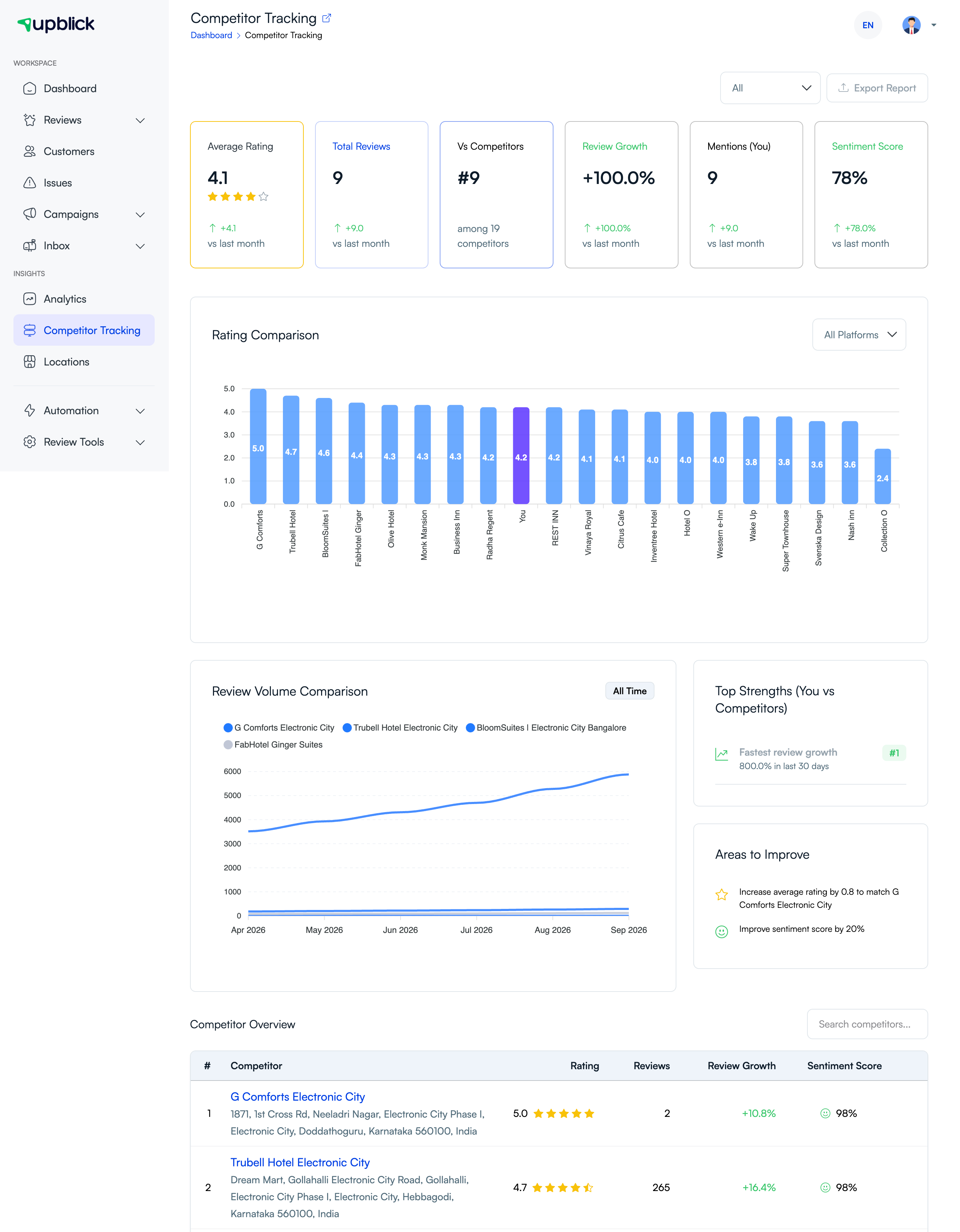
Competitor performance can be reviewed from the Competitor Tracking area, where UpBlick shows comparison information for your selected competitors and your own location.
You can compare reputation signals such as average rating, review count, review growth, sentiment score, mentions, ranking against competitors, and customer feedback patterns.
The dashboard helps you see whether your business is leading, catching up, or falling behind nearby competitors.
- Open Competitor Tracking.
- Select the competitor or comparison view you want to review.
- Compare ratings, review counts, review growth, mentions, and sentiment score.
- Use the rating comparison and review volume graphs to understand how competitors are performing over time.
- Look for strengths you can protect and gaps where your business can improve.
- Use the findings to adjust review collection, customer follow-ups, and service priorities.
Performance comparison works best when reviewed regularly, not only when ratings change suddenly.
Related Articles
Turn every customer touchpoint into review growth
Use UpBlick to collect feedback, request Google reviews, recover bad experiences, and understand customer sentiment.
Need help with UpBlick?
Use these guides to set up review collection, customers, WhatsApp automation, issue recovery, and reporting.
Start growing reviews with UpBlick