Why Your Business Isn't Getting Google Reviews (And How to Fix It)

Karthik Subramanian
Published on 10 Jul, 2026
If your business isn't getting Google Reviews, the problem is rarely that customers don't like your business. More often, it's because customers forget, the review process is inconvenient, or they're never asked at the right time. By fixing a few common mistakes, you can consistently generate authentic Google Reviews, strengthen customer trust, and improve your visibility on Google Search and Google Maps.
You've just finished serving a happy customer. They thanked your staff, smiled while leaving your store, and even said, "We'll definitely come back again!"
A few days later, you check your Google Business Profile expecting to see a new review.
Nothing.
If this sounds familiar, you're not alone. Thousands of business owners—from restaurants and salons to clinics, gyms, retail stores, and service providers—share the same frustration:
"Our customers are happy, but nobody leaves Google Reviews."
The good news is that most customers aren't refusing to leave reviews. In fact, many are happy to share their experience. The real problem is usually the review collection process itself.
Small issues like asking at the wrong time, forgetting to send a review link, or never following up can dramatically reduce the number of reviews your business receives.
In this guide, we'll explore the most common reasons businesses struggle to collect Google Reviews and, more importantly, how you can fix each one.

The Biggest Myth About Google Reviews
One of the biggest misconceptions among business owners is that customers simply don't like leaving reviews.
While this may feel true when your Google Business Profile hasn't received a new review for weeks, it's usually not the reality.
Think about your own behavior as a customer. You've probably left reviews for a restaurant after an amazing meal, rated a hotel after a memorable stay, or reviewed a product you loved. You didn't leave the review because someone forced you—you left it because the experience stood out and the process was easy.
Your customers behave in exactly the same way.
They aren't avoiding reviews. They're simply busy with work, family, travel, and everyday life. Unless you make the process simple and remind them at the right moment, leaving a review rarely becomes a priority.
Successful businesses understand this. Instead of hoping customers will remember, they build a review collection process that naturally encourages feedback after every positive interaction.
Mistake #1: You're Not Actually Asking for Reviews
This might sound obvious, but it's one of the biggest reasons businesses receive very few Google Reviews.
Many owners assume that satisfied customers will automatically leave feedback.
Unfortunately, that's rarely how people behave.
Even customers who absolutely loved your service often leave without thinking about writing a review. It's not because they didn't enjoy the experience—they simply have other things on their mind.
Research consistently shows that customers are much more likely to leave a review when they're asked politely. Most people appreciate the opportunity to support businesses they like, but they usually need a simple reminder.
Businesses that make asking for reviews part of their everyday customer journey consistently receive more reviews than those relying on luck.
How to Fix It
- Train your staff to ask every satisfied customer.
- Include review requests as part of your checkout or appointment process.
- Provide a direct Google Review link immediately after the interaction.
- Ask naturally rather than using a scripted sales pitch.
Remember, you're not asking customers for a favor—you're giving them an opportunity to share an honest experience that can help others.
Mistake #2: You're Asking at the Wrong Time
Timing can make the difference between receiving a review and being forgotten.
Many businesses wait until days or even weeks after a customer interaction before requesting feedback. By then, the excitement has faded, daily responsibilities have taken over, and your business is no longer top of mind.
Imagine visiting a dentist today and receiving a review request three weeks later. Chances are you've already moved on and may not even remember the details of your appointment.
Now imagine receiving that request immediately after a successful appointment while you're still feeling satisfied.
Which situation is more likely to result in a review?
Customers are most willing to leave feedback when their positive emotions are strongest. Waiting too long dramatically reduces participation.
Best Times to Ask for a Review
- Immediately after payment.
- After completing a successful appointment.
- Following product delivery.
- After receiving positive verbal feedback from the customer.
- When a customer says, "Thank you" or "That was great!"
These moments create a natural opportunity to ask for an honest Google Review while the experience is still fresh.
Mistake #3: Customers Simply Forget
One of the most overlooked reasons businesses don't receive Google Reviews is surprisingly simple—customers forget.
Think about how busy people are today. Between work, family responsibilities, notifications, emails, and daily commitments, leaving a Google Review often falls to the bottom of the priority list.
This doesn't mean your customers were unhappy. In many cases, they genuinely intended to leave a review but became distracted before they had the chance.
Human psychology plays a big role here. People naturally focus on urgent tasks first and postpone activities that aren't immediately important. Writing a review usually falls into that second category.
The businesses that consistently collect reviews understand this behavior. Rather than assuming silence means dissatisfaction, they build simple reminder systems that gently encourage customers to complete the review.
How to Fix It
- Send one polite reminder within 2–5 days.
- Include your direct Google Review link.
- Keep the message short and friendly.
- Thank the customer regardless of whether they leave a review.
- Avoid sending repeated reminders that may feel like spam.
A single well-timed follow-up often makes the difference between receiving no review and receiving a valuable five-star recommendation.

Mistake #4: You're Not Sharing a Direct Google Review Link
Imagine asking a customer to leave a review but expecting them to search for your business on Google, find your Business Profile, click on the Reviews section, and then write their feedback.
Every additional step reduces the chances of receiving a review.
Customers value convenience. Even those who genuinely want to support your business may abandon the process if it feels complicated or takes too much time.
This is one of the most common mistakes businesses make. They ask for reviews but never provide a direct way for customers to leave one.
A direct Google Review link removes friction. Instead of searching for your business, customers land directly on the review page where they can immediately share their experience.
How to Fix It
- Create your direct Google Review link from your Google Business Profile.
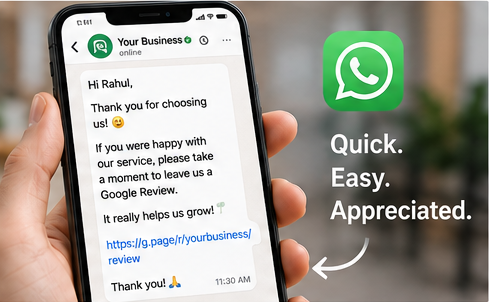
- Include the link in WhatsApp messages, SMS, and emails.
- Add the link to invoices, digital receipts, and thank-you pages.
- Use shortened URLs for easier sharing.
The easier you make the review process, the more customers will complete it.

Mistake #5: You Don't Have a Follow-up Process
Many businesses ask for a review only once.
If the customer doesn't respond immediately, the opportunity disappears forever.
However, silence doesn't necessarily mean the customer wasn't interested. More often than not, they simply forgot.
A gentle reminder can significantly increase your review conversion rate because it brings your request back to the customer's attention.
The key is moderation. Sending one thoughtful reminder feels helpful. Sending repeated reminders every day feels like spam and can damage your relationship with the customer.
Best Follow-up Practice
- Send the first review request immediately after the service.
- If no review is received, send one reminder within 2–5 days.
- Thank customers regardless of whether they leave a review.
- Never pressure customers into writing positive reviews.
Businesses that consistently follow up receive considerably more reviews than businesses relying on a single request.
Mistake #6: The Customer Experience Isn't Memorable
Sometimes the review collection process isn't the problem.
The real issue is the customer experience itself.
Customers leave reviews because they feel something—whether it's delight, gratitude, disappointment, or frustration.
If your service feels average or forgettable, customers simply move on with their day without feeling motivated to write about it.
Before focusing on collecting more reviews, ask yourself:
- Are customers greeted warmly?
- Are appointments handled on time?
- Is communication clear and professional?
- Are complaints resolved quickly?
- Would you recommend your own business?
Great reviews begin with great customer experiences.
Businesses that consistently exceed customer expectations naturally receive more positive feedback without aggressive marketing.
Mistake #7: You're Afraid to Ask
Surprisingly, many business owners hesitate to ask for reviews because they don't want to appear pushy.
This fear is understandable, but it often prevents businesses from receiving valuable customer feedback.
Remember that customers who had a positive experience are usually happy to support your business. In many cases, they're simply waiting to be asked.
Asking politely isn't annoying—it shows that you value customer feedback and want to improve.
The difference lies in how you ask.
Instead of saying:
"Please give us a 5-star review."
Try saying:
"If you were happy with your experience today, we'd really appreciate it if you could share your honest feedback on Google. Your review helps other customers discover our business."
This approach feels genuine, respectful, and customer-focused.
Mistake #8: You're Ignoring Existing Reviews
Collecting reviews is only half the job.
Many businesses receive reviews but never respond to them.
While customers appreciate receiving a reply, your responses are actually read by many more people than the original reviewer.
Future customers often evaluate how businesses respond before deciding whether to trust them.
Professional responses demonstrate that your business values customer opinions, accepts feedback, and genuinely cares about customer satisfaction.
This applies to both positive and negative reviews.
Respond to Positive Reviews
- Thank the customer personally.
- Mention something specific from their review.
- Invite them to visit again.
Respond to Negative Reviews
- Remain calm and professional.
- Acknowledge the customer's concern.
- Apologize where appropriate.
- Offer to continue the conversation privately.
Businesses that actively respond to reviews often build stronger trust than businesses that simply accumulate ratings without engaging with customers.
Your Google Review Health Checklist
If your business isn't receiving enough Google Reviews, don't assume customers are unwilling to leave feedback. In most cases, the issue lies somewhere in your review collection process.
Use the checklist below to evaluate your current strategy. If you answer "No" to any of these questions, you've identified an opportunity to improve.
- ✅ Do you ask every satisfied customer for a review?
- ✅ Do you ask immediately after a positive experience?
- ✅ Do you share a direct Google Review link?
- ✅ Do you provide a QR Code for walk-in customers?
- ✅ Do you send review requests through WhatsApp, SMS, or Email?
- ✅ Do you send one polite follow-up reminder?
- ✅ Do you respond to every Google Review?
- ✅ Are your employees trained to request reviews naturally?
- ✅ Do you monitor your Google Business Profile regularly?
- ✅ Are you consistently receiving fresh reviews every month?
The more boxes you can check, the healthier your online reputation will become over time.

Create a Review Collection System—Not Just a One-Time Campaign
One of the biggest differences between businesses that receive hundreds of Google Reviews and those that struggle to collect even a few is consistency.
Successful businesses don't ask for reviews only when they remember. Instead, they build a simple process that works every single day.
Think of review collection as part of your customer journey rather than a marketing campaign.
For example:
- A customer completes a purchase.
- They receive a thank-you message.
- A review request is sent automatically.
- If they don't respond, one friendly reminder is sent a few days later.
- The business responds to every review received.
This process repeats for every customer, ensuring that no opportunity to collect feedback is missed.
Over time, these small actions create a steady flow of authentic Google Reviews that strengthen your reputation and improve customer trust.

How UpBlick Makes Google Review Collection Easier
Managing review requests manually works when you have only a handful of customers. But as your business grows, remembering who to contact, when to follow up, and which reviews still need responses quickly becomes overwhelming.
This is where automation makes a real difference.
UpBlick is designed to simplify every stage of the Google Review journey—from requesting feedback to monitoring reviews and responding professionally.
With UpBlick, businesses can:
- Send personalized Google Review requests through WhatsApp, SMS, and Email.
- Create branded QR Codes for counters, invoices, menus, and reception areas.
- Automatically send follow-up reminders to customers who haven't responded.
- Monitor new Google Reviews from a single dashboard.
- Respond quickly to positive and negative reviews.
- Manage reviews for multiple business locations from one place.
- Track review growth and customer engagement over time.
Instead of relying on memory or spreadsheets, businesses can create a repeatable review collection process that works consistently every day.
The result isn't just more reviews—it's a stronger online reputation, improved customer trust, and better visibility on Google Search and Google Maps.
Final Thoughts
If your business isn't getting Google Reviews, don't assume customers don't appreciate your products or services.
More often than not, the issue isn't customer satisfaction—it's the review collection process.
By asking at the right time, making the review process effortless, following up politely, and consistently responding to customer feedback, you can dramatically increase the number of authentic Google Reviews your business receives.
Remember, every satisfied customer is a potential advocate for your business. The key is giving them a simple and convenient way to share their experience.
Start by fixing one problem at a time:
- Ask every satisfied customer.
- Share a direct review link or QR Code.
- Send one friendly reminder.
- Respond to every review.
- Turn review collection into a daily business process.
Small improvements made consistently can transform your online reputation. Over time, those reviews become one of your most valuable business assets—helping you build trust, improve Local SEO, attract new customers, and grow your business.
Key Takeaways
- Most customers are willing to leave reviews—they simply need a reminder.
- Timing is one of the biggest factors in review conversion.
- Always provide a direct Google Review link or QR Code.
- One polite follow-up can significantly improve response rates.
- Responding to reviews builds trust with both existing and future customers.
- A consistent review collection process outperforms occasional review campaigns.
- Tools like UpBlick help automate review requests, follow-ups, and review management, making it easier to grow your online reputation.
Explore related UpBlick pages
Continue with these UpBlick pages related to this topic:
- Google review generation software
- WhatsApp review automation
- Google review guide
- Review marketing guide
- Book an UpBlick demo
- Review marketing feature
- Review and feedback analytics
Want to grow faster with better reviews?
Explore how automation, customer feedback workflows, and local reputation tools can help your business win more trust.
Why Your Business Isn't Getting Google Reviews (And How to Fix It) FAQs
Grow your local reputation with confidence
Use UpBlick to monitor reviews, improve customer experience, and turn happy customers into long-term advocates.
Start your review growth journeyNo Credit Card Required • Setup in Minutes • Built for Local Businesses