अपब्लिक गूगल पुनरावलोकनांची जागा घेते का?
पुनरावलोकने आणि पुनरावलोकन संग्रह
नाही. अपब्लिक गूगल पुनरावलोकनांची जागा घेत नाही. अपब्लिक गूगल समीक्षा च्या बरोबरीने व्यवसायांना ग्राहकांचा अभिप्राय गोळा करण्यात, पुनरावलोकन विनंत्या पाठवण्यात, ग्राहकांना योग्य गूगल पुनरावलोकन पृष्ठावर मार्गदर्शन करून आणि पुनरावलोकन क्रियाकलापांमधून शिकण्यास मदत करून कार्य करते.
कसे अपब्लिक आणि गूगल समीक्षा एकत्र काम करतात
पुनरावलोकन संकलन आणि ग्राहक फीडबॅक स्तर म्हणून अपब्लिक चा विचार करा. गूगल हे सार्वजनिक पुनरावलोकन प्लॅटफॉर्म आहे जेथे अंतिम गूगल पुनरावलोकन सबमिट केले जाते आणि प्रदर्शित केले जाते.
| अपब्लिक यामध्ये मदत करते | गूगल नियंत्रणे |
|---|---|
| उपलब्ध चॅनेलद्वारे पुनरावलोकन विनंत्या पाठवत आहे. | गूगल पुनरावलोकन फॉर्म आणि अंतिम पुनरावलोकन सबमिशन. |
| कॉन्फिगर केल्यावर गूगल स्टेपच्या आधी ग्राहकांचा फीडबॅक गोळा करणे. | गूगल पुनरावलोकन सार्वजनिकरीत्या दिसते का. |
| निवडलेल्या स्थानासाठी जतन केलेली गूगल पुनरावलोकन लिंक उघडत आहे. | गूगल खाते साइन-इन आणि पुनरावलोकन प्रक्रिया. |
| ग्राहक अभिप्रायावर आधारित संपादन करण्यायोग्य पुनरावलोकन मसुदे सुचवत आहे. | ग्राहकाचे अंतिम रेटिंग आणि गूगल वरील पुनरावलोकन मजकूर. |
| ट्रॅकिंग विनंती क्रियाकलाप, भावना, समस्या आणि अंतर्दृष्टी. | गूगल व्यवसाय प्रोफाइल रँकिंग, फिल्टरिंग आणि प्रदर्शन नियम. |
अपब्लिक काय करू शकते
- तुम्हाला ग्राहकांना फीडबॅक आणि पुनरावलोकनांसाठी विचारण्यास मदत करा.
- तुमची जतन केलेली गूगल पुनरावलोकन लिंक वापरून योग्य गूगल पुनरावलोकन पृष्ठावर ग्राहकांना पाठवा.
- गूगल वर सुरू ठेवण्यापूर्वी ग्राहकांना फीडबॅक प्रश्नांची उत्तरे देऊ द्या.
- ग्राहकाच्या स्वतःच्या फीडबॅकवर आधारित संपादन करण्यायोग्य पुनरावलोकन मसुदे सुचवा.
- पुनरावलोकन विनंती क्रियाकलाप आणि स्मरणपत्रे ट्रॅक करा.
- ग्राहक भावना, व्यवसाय शक्ती, आवर्ती तक्रारी आणि समस्या ओळखण्यास मदत करा.
- तुमच्या टीमला ग्राहकांच्या फीडबॅकला जलद आणि अधिक सातत्याने प्रतिसाद देण्यासाठी मदत करा.
अपब्लिक काय करू शकत नाही
- ग्राहकासाठी गूगल पुनरावलोकन पोस्ट करा.
- ग्राहकाला गूगल पुनरावलोकन देण्यास भाग पाडा.
- ग्राहकाचे स्टार रेटिंग निवडा.
- अधिक गूगल पुनरावलोकने किंवा उच्च गूगल रेटिंगची हमी.
- हमी देतो की गूगल सबमिट केलेले पुनरावलोकन सार्वजनिकपणे दर्शवेल.
- नकारात्मक गूगल पुनरावलोकन काढा किंवा लपवा.
- तुमचे गूगल व्यवसाय प्रोफाइल पुनर्स्थित करा.
ग्राहकाला काय अनुभव येतो
जेव्हा तुमच्या वर्कफ्लोमध्ये फीडबॅक संकलनाचा समावेश असतो, तेव्हा ग्राहक त्यांच्या अनुभवाला रेट करू शकतो आणि सुरू ठेवण्यापूर्वी अपब्लिक मध्ये सोप्या प्रश्नांची उत्तरे देऊ शकतो. ग्राहक गूगल वर पोहोचण्यापूर्वी

मी कृत्रिम बुद्धिमत्ता-सहाय्यित मसुदे सक्षम केले असल्यास, ग्राहक सुचवलेला मसुदा निवडू शकतो, तो संपादित करू शकतो किंवा स्वतःचा पुनरावलोकन मजकूर लिहू शकतो.
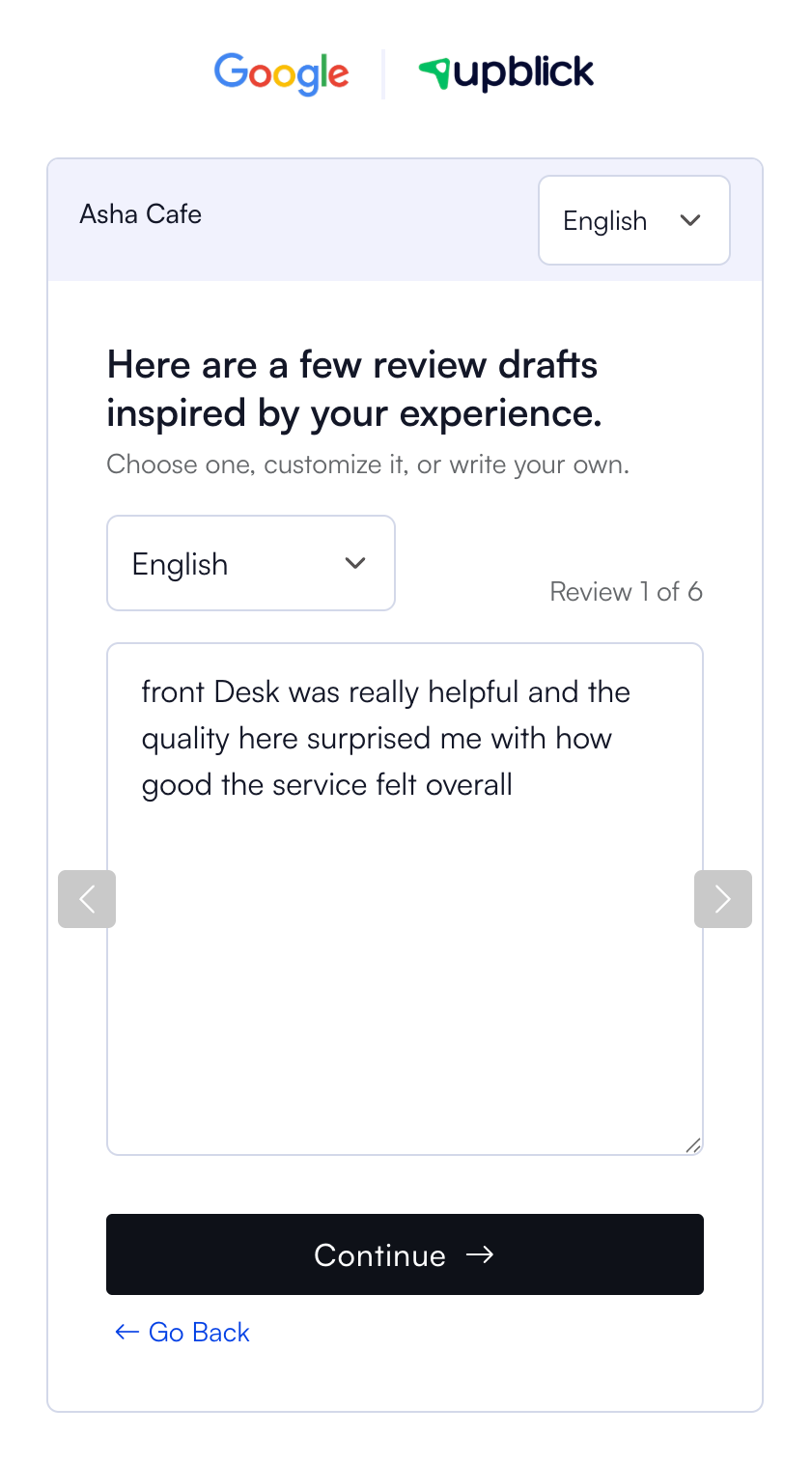
जेव्हा प्रवाहामध्ये गूगल स्टेप समाविष्ट असते, तेव्हा ग्राहक निवडू शकतो गूगल वर शेअर करा. अपब्लिक नंतर त्या स्थानासाठी जतन केलेली गूगल पुनरावलोकन लिंक उघडते.

व्यवसाय गूगल पुनरावलोकनांसह अपब्लिक का वापरतात
व्यवसाय अपब्लिक वापरतात कारण पुनरावलोकने गोळा करणे हे गूगल लिंक शेअर करण्यापेक्षा जास्त आहे. अपब्लिक ग्राहकांच्या फीडबॅक, विनंतीची वेळ, स्मरणपत्रे, क्यूआर कोड, एनएफसी कार्ड, टीम फॉलो-अप आणि अंतर्दृष्टी यांच्याभोवती संपूर्ण प्रक्रिया आयोजित करण्यात मदत करते.
हे व्यवसायाला ग्राहक अनुभव सुधारण्यास मदत करते ज्यामुळे कालांतराने चांगली पुनरावलोकने होतात.
गूगल कनेक्शन अचूक कसे ठेवायचे
- अपब्लिक मध्ये प्रत्येक व्यवसाय स्थान जोडा.
- प्रत्येक स्थानासाठी योग्य गूगल पुनरावलोकन लिंक जतन करा.
- तुमच्या कार्यप्रवाहाशी जुळणारा पुनरावलोकन संकलन मोड निवडा.
- लिंक, क्यूआर कोड किंवा एनएफसी कार्डवरून ग्राहकाच्या प्रवासाची चाचणी करा.
- पुष्टी करा की गूगल पायरी योग्य व्यवसाय सूची उघडते.
- मॉनिटर पुनरावलोकन विनंत्या, अभिप्राय, समस्या आणि डॅशबोर्ड अंतर्दृष्टी.
सर्वोत्तम पद्धती
- एक प्रामाणिक अभिप्राय आणि पुनरावलोकनांसाठी ग्राहकांना विचारा.
- फक्त समाधानी ग्राहकांना गूगल पुनरावलोकने सोडण्यास सांगू नका.
- विशिष्ट रेटिंग किंवा सकारात्मक पुनरावलोकनासाठी प्रोत्साहन देऊ नका.
- वास्तविक सेवा समस्यांचे निराकरण करण्यासाठी ग्राहक अभिप्राय वापरा.
- सहानुभूती आणि उपयुक्त पुढील चरणांसह नकारात्मक अभिप्रायाला प्रतिसाद द्या.
- गूगल पुनरावलोकन दुवे नियमितपणे तपासा, विशेषत: बहु-स्थान खात्यांसाठी.
- ठेवा अपब्लिक आणि गूगल व्यवसाय प्रोफाइल स्थान तपशील संरेखित.
समस्यानिवारण
वारंवार विचारले जाणारे प्रश्न
मी गूगल पुनरावलोकने बदलण्यासाठी क्लिक करा?
नाही. अपब्लिक हे पुनरावलोकन संकलन आणि अभिप्राय प्लॅटफॉर्म आहे जे आपल्या गूगल पुनरावलोकन लिंकसह कार्य करते.
अपब्लिक पुनरावलोकने थेट गूगल वर प्रकाशित करू शकतात?
नाही. ग्राहकांनी गूगल वर त्यांची स्वतःची पुनरावलोकने सबमिट करणे आवश्यक आहे.
अपब्लिक खात्री देऊ शकतो की गूगल पुनरावलोकन दर्शवेल?
नाही. गूगल पुनरावलोकन प्रक्रिया, फिल्टरिंग आणि सार्वजनिक प्रदर्शन नियंत्रित करते.
व्यवसायांना अधिक गूगल पुनरावलोकने मिळविण्यात अपब्लिक मदत करू शकतो?
होय. अपब्लिक पुनरावलोकन विनंत्या पाठवून, क्यूआर आणि एनएफसी पुनरावलोकन साधने ऑफर करून आणि ग्राहकांना योग्य गूगल पुनरावलोकन पृष्ठावर मार्गदर्शन करून घर्षण कमी करू शकते.
मी अजूनही माझी गूगल व्यवसाय प्रोफाइल व्यवस्थापित करावी?
होय. तुमची गूगल व्यवसाय प्रोफाइल अचूक आणि सक्रिय ठेवा. अपब्लिक त्याऐवजी नाही तर त्याच्या बाजूने कार्य करते.
संबंधित लेख
प्रत्येक ग्राहक संपर्काला पुनरावलोकन वाढीत बदला
अपब्लिकच्या मदतीने अभिप्राय गोळा करा, गुगल पुनरावलोकनांची विनंती करा, खराब अनुभव हाताळा आणि ग्राहक भावना समजून घ्या.
अपब्लिकमध्ये मदत हवी आहे का?
पुनरावलोकन संकलन, ग्राहक व्यवस्थापन, व्हॉट्सअॅप संदेश, स्मरणपत्रे आणि अहवाल समजून घेण्यासाठी या मार्गदर्शिका वापरा.
अपब्लिकसह पुनरावलोकन वाढ सुरू करा